Kuro connects the people planning the event, preparing the equipment and coordinating the road ahead. Live updates across web and mobile keep the work in sync.
A change in the warehouse matters to the person coordinating the event. Shared updates help your team follow progress without chasing the latest version.
Harbour showcaseWORKFLOW ILLUSTRATION · SAMPLE DATA
Operations · Web
Follow the preparation.
Equipment prepared
2 of 4
Shared pullsheet progress
Warehouse · Web & mobile
Keep the job moving.
Pullsheet
Preparing equipment
Audio equipment2 of 4
The same preparation information
Driver · Mobile
Stay connected on the road.
Job information
Review the pullsheet
WarehouseVenue
Awaiting a location update
01 / 03
The same job, wherever you work.
Operations and warehouse teams share the pullsheet. Mobile users keep the job close at hand.
Operations · Web
Follow the preparation.
Equipment prepared
4 of 4
Shared pullsheet progress
Warehouse · Web & mobile
Keep the job moving.
Pullsheet
Preparation updated
Audio equipment4 of 4
The same preparation information
Driver · Mobile
Stay connected on the road.
Job information
Updated pullsheet
WarehouseVenue
Awaiting a location update
02 / 03
Warehouse progress reaches operations.
A preparation update is reflected in the shared job information across web and mobile.
Operations · Web
Follow the preparation.
Equipment prepared
4 of 4
Shared pullsheet progress
Warehouse · Web & mobile
Keep the job moving.
Pullsheet
Preparation updated
Audio equipment4 of 4
The same preparation information
Driver · Mobile
Stay connected on the road.
Job information
Tracking session active
WarehouseVenue
Latest reported location
03 / 03
A separate location update from the driver.
During an active tracking session, Kuro Mobile shares a location update for operations to view.
1 / 3
This is an illustrated example, not a live connection or a product screenshot. Preparation and location updates are separate actions.
02 / From first plan to return
The details connect. So does your team.
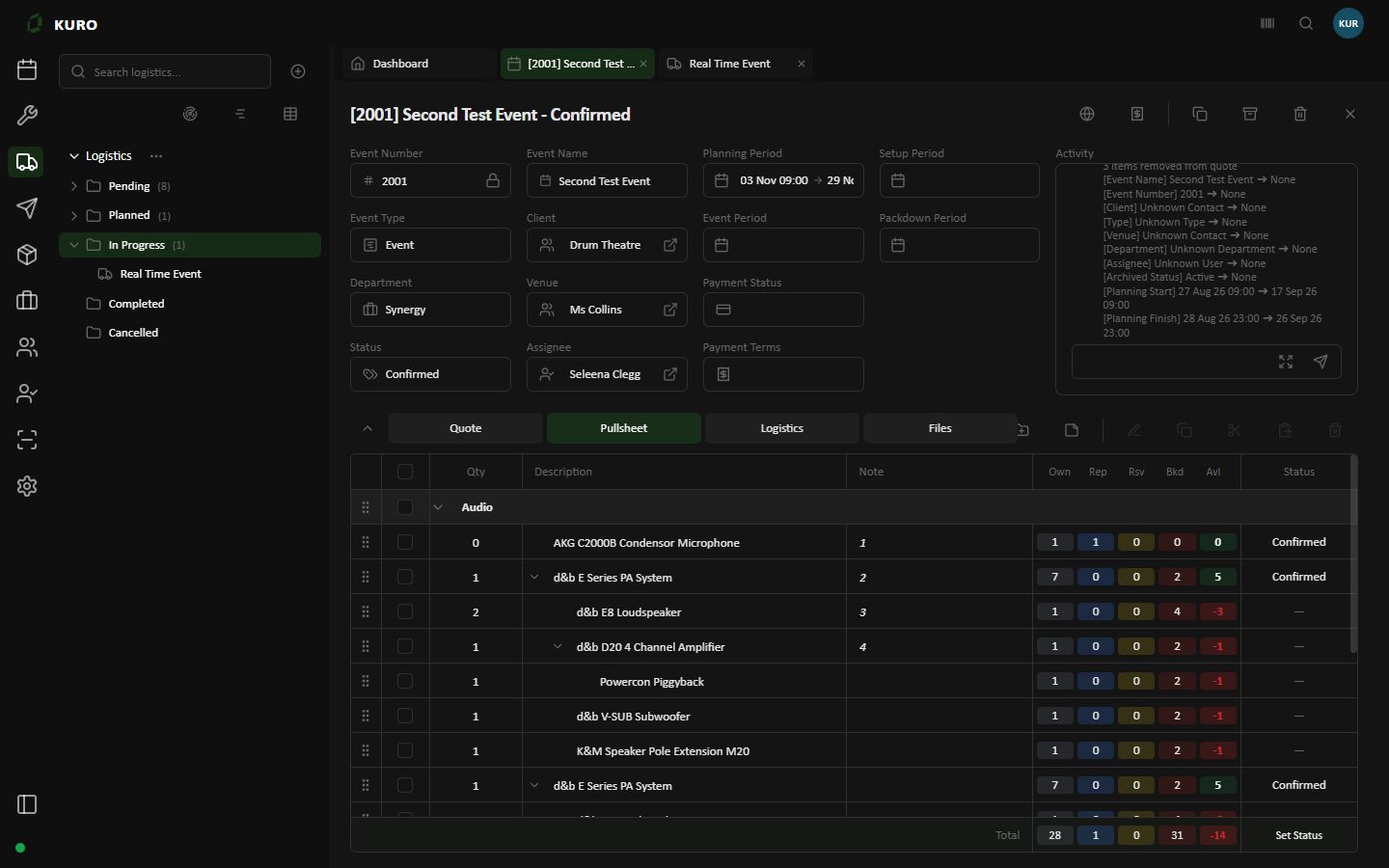
Kuro Web / PullsheetRECORDED SCREEN · DEMO DATA
Own Owned stockRep In repairRsv ReservedBkd BookedAvl Available
Kuro Web · Fictional demo event · Captured 8 October 2026. A detail from a recorded screen, not a live connection.Open full-size screen ↗
Keep the event together.
Bring the quote, pullsheet, logistics and files into the event workspace. Keep the detail close as the plan takes shape.
See what is available.
See owned, reserved, booked, available and repair quantities in context. Make equipment conversations easier with a clear picture of the requirements and shortages.
Follow warehouse progress.
Shared pullsheet updates connect warehouse work with operations across web and mobile. Follow preparation without asking someone to send a separate status update.
Keep vehicles in view.
View location updates shared by Kuro Mobile during active tracked jobs. Keep vehicle movement alongside the logistics information for the event.
Thoughtfully designed around the way your team works.
Clear information, familiar workflows and a shared view of the job. Related details stay together, with room for the different ways people work.
Built for connected work
Kuro's web workspace uses React and Next.js. Its mobile app uses React Native and Expo. Shared Firebase data and realtime subscriptions connect supported workflows across devices.
Vehicle locations are reported from an active mobile tracking session. Update timing depends on connectivity, permissions and device conditions.